Polaroid Poster Maker
Create a poster for your favourite drama, anime, movie or TV show.
Find a title Optional
Add an image
Sample image — replace it with your own.
Sample illustration
Crop & position
Edit poster
More options
Layout
Download
Open download ↗Saved posters
Stored in this browser only.
Drag to move. Pinch or scroll to zoom. You can also use the arrow, plus and minus keys.
Some credits are shortened. Edit credits or show fewer cast names.
Help
Search for credits or enter them yourself. Upload an image you can reproduce, adjust the crop, then download a PNG or PDF. Your uploads stay in your browser.
4×6 exports use a 3.49-inch square image. A4 uses a 183.2 mm square. Print the PDF at actual size.
Polaroid Poster: free maker, templates and printing
Make a Polaroid Poster online
A Polaroid Poster turns a scene you love into a simple image-and-credits design. Use this free polaroid poster maker to create a personal keepsake for a drama, anime, movie or television series. Upload an image you can reproduce, add a title and choose the details that belong on the page. The tool works in your browser without an account, and you can download your finished design as a PNG or PDF. Start with the original cream frame, switch to charcoal, or customise an editable layout. This online polaroid poster generator builds the frame and credits around your chosen image.
How to use the polaroid poster maker
Choose a category, then search for a title if you want help filling in the credits. Wikidata and Wikipedia can provide a starting point for the year, original title, genre, director and cast. Review the result because entries can be incomplete. Next, upload a JPG, PNG or WebP, or select a reusable Wikimedia image after checking its thumbnail and licence. Adjust the square crop with Fit, Fill, zoom and position controls. Edit the title, hide unwanted fields and select your print size before downloading. Undo lets you step back through recent changes.
Choose an editable polaroid poster template
Choose Classic for the original square scene, condensed title and aligned credits. Editorial uses a landscape image and serif heading, while Minimal keeps the presentation quieter. These free polaroid poster templates are available in the template gallery. For a blank polaroid template or image-only poster, hide the optional text fields. You can also add a short caption, choose a custom paper colour or choose cream, charcoal or rose for the original finish.
Create a K-drama polaroid poster
Make a K-drama polaroid poster around a favourite moment, character or setting. The original-title field accepts Korean text, so a Korean drama poster can include both an English name and Hangul. Check translated titles against the year before accepting a search result, especially when different series share similar names. Keep the writer, director, network and episode count, or remove the credits you do not need. A romance, thriller or slice-of-life drama works with the same frame. Open the K-drama poster guide for category-specific tips.
Design a C-drama polaroid poster
A C-drama polaroid poster can highlight a historical costume, a modern romance or a landscape from a fantasy series. Search a recognised title, then edit the original Chinese name and credits yourself if necessary. Wuxia, xianxia and other Chinese drama genres do not need different software: the same editable poster maker lets you change the scene and text. Wide shots often work better with Fit, while a portrait may suit Fill. Review Chinese characters in the preview and enlarged viewer. The C-drama poster page explains the workflow.
Make an anime polaroid poster
The anime section supports both series and films. Create an anime polaroid poster with a scene, a Japanese title and the credits you choose to display. Series can show episode count and network; anime movies can show runtime and studio. Anime lookup results may include remakes, adaptations or similarly named entries, so read their descriptions and confirm the year. You can also enter everything manually for an anime character poster, original fan artwork or a design that does not match a database entry.
Use a licensed illustration or an image you have permission to reproduce. Search availability does not establish reuse rights. Build an anime poster template around the Classic, Editorial or Minimal layout, then preview the crop and text before exporting. Visit the anime polaroid poster maker guide, or start an anime poster directly.
Movie and TV show polaroid posters
Use the movie polaroid poster maker for a film still, release year, director, studio and runtime. A minimalist movie poster can focus on one image and a title instead of a full credits list. For a TV show polaroid poster, check whether an episode total describes a season or the entire series. Add a season number to your title when that distinction matters. For a matching collection, use the same layout and print size for each show. All credits are editable.
Download a printable polaroid poster
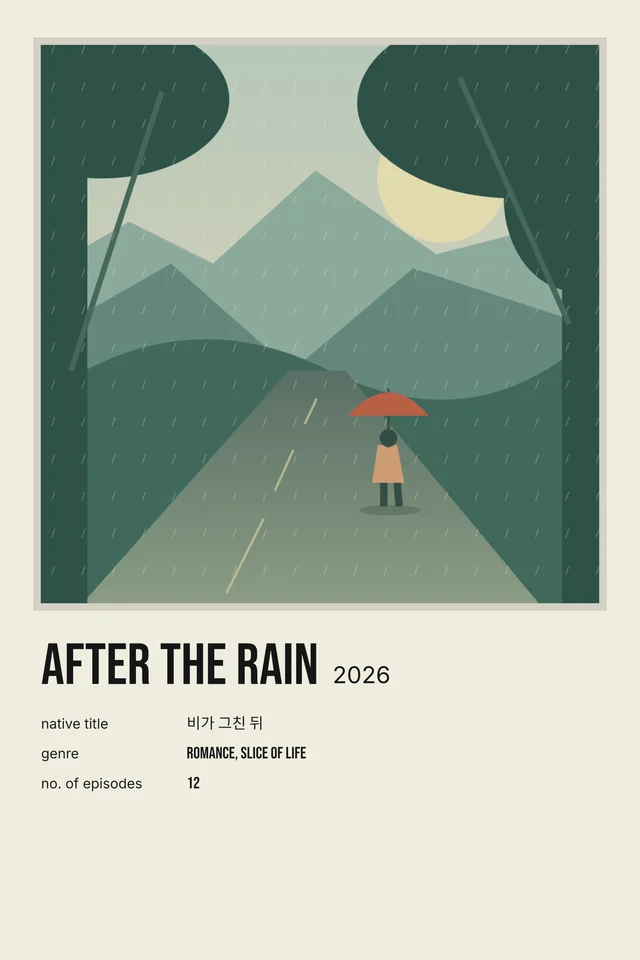
Choose a 4×6 polaroid poster for a small print or an A4 polaroid poster for a larger page. In the Classic layout, the square image measures 3.49 inches on a 4×6 print and about 183.2 mm on A4. The high-resolution PNG downloads at 2731×4096 pixels for 4×6, or 2896×4096 pixels for A4. A polaroid poster PDF uses the selected physical page dimensions. Print it at actual size on matching paper and check your printer’s margins. A larger output cannot restore detail missing from a small source photo, so follow the image-quality warning and try a test print. See the After the Rain print example for both sizes and the crop settings used.
Read the credits and keep your changes
On a phone, the poster preview appears above the controls. Minimise it to reach the editor faster, or choose Enlarge preview to read the text at a higher zoom. Classic fits credits on single lines. The cast selector shows the first three or five names while keeping the complete list editable. Empty fields stay off the poster. Your current draft can resume after reload. Open Saved posters to disable draft restoration or save a separate editable copy. Local drafts and saved posters stay in this browser. Keep a downloaded copy if you want to move a finished poster to another device.
Free downloads, local uploads and image rights
This online polaroid poster creator has no required sign-up and does not add a site watermark. Uploaded photos are processed locally in your browser. Title searches and Wikimedia image previews contact those external services, and image licences still apply. Required attribution can appear on an exported design even when other text is hidden; it is a source-image credit, not a promotional watermark. Review the image-rights guide before reproducing or selling a design. This independent tool is not affiliated with Polaroid, anime publishers, television networks or movie studios.
Polaroid Poster FAQs
What is a Polaroid Poster?
A polaroid-style poster combines a framed image with a title, credits and an optional caption. Polaroid Poster is an independent online maker for creating these designs around your favourite dramas, anime, movies and TV shows. It is not affiliated with Polaroid.
How do I make a polaroid poster online?
Choose a category, search for a title or enter your own details, then upload an image you have permission to use. Adjust the crop, colours and text, review the preview, and download your poster as a PNG or PDF.
Is the polaroid poster maker free?
Yes. You can create and download posters for free, without signing up. Exports have no tool watermark. If an imported image requires attribution, its source credit and licence information remain on the poster.
Can I make K-drama and C-drama polaroid posters?
Yes. Choose K-drama or C-drama to look up a title and edit its year, original title, cast and credits. You can enter Korean or Chinese titles yourself. Review automatically filled details before downloading, because Wikimedia records may be incomplete.
How do I make an anime polaroid poster?
Choose Anime, then select Series or Film. Search for the correct adaptation or enter the title and credits yourself. Add an image you can reproduce, choose a layout and download. Series mode uses episode count and network; Film mode uses runtime and studio.
Can I create movie and TV show polaroid posters?
Yes. Movie mode includes runtime and studio, while TV shows use episode count and network. You can edit the details to feature a favourite film, series or season, then add your own caption and authorised image.
Are there free polaroid poster templates?
Yes. Choose Classic, Editorial or Minimal, or start with a preset from the Templates page. You can change colours, replace the image and hide individual text fields. For an image-only frame, use the image-only preset or turn off the text fields.
Can I upload my own image or use an image from Wikipedia?
Both options are available. Upload an authorised JPG, PNG or WebP, or look up a title and review its available Wikimedia image. Wikipedia images are not automatically free to reuse. The importer accepts supported reusable images with sufficient licence information and keeps required attribution.
What size is a polaroid poster download?
Choose 4×6 inches or A4. The 4×6 PNG is 2731×4096 pixels, and the A4 PNG is 2896×4096 pixels. PDFs use the selected physical page dimensions. These are the tool’s poster sizes, rather than the dimensions of a particular instant-film product.
Should I download my poster as PNG or PDF?
Choose PNG for digital sharing or a printing service that accepts images. Choose PDF when you want a page with the selected physical print size. For home printing, select matching paper and print at Actual size or 100%; check your printer’s margins.
Why does my poster image look blurry?
A small source image or heavy crop can look blurry when enlarged. Use a higher-resolution image, reduce zoom or choose a smaller print size. The editor warns when the selected crop has low print resolution. Exporting a large file cannot restore missing image detail.
How can I read and edit small poster text on my phone?
Tap Enlarge preview to inspect the title and credits in a zoomable viewer. Edit the text fields below the preview, hide fields you do not need, or shorten the displayed cast list. Check the enlarged preview again before downloading.
Can I save a poster and edit it later?
Yes. The current image and design can resume after a reload. In Saved posters, turn off Keep draft after reload if you prefer, or choose Save poster to keep a separate editable copy. Drafts and saved posters stay in this browser and can be removed by clearing site data.
Are my uploaded photos sent to a server?
Your uploads and poster exports are processed in your browser. Saved projects also stay in this browser. Title searches contact Wikimedia services, and importing a Wikimedia image contacts its image host. No account is needed to create or download a poster.